


SFP Transceiver Module: Essentials for Network Optimization

LINK-PP Official ·


SFP transceiver modules are vital components in modern networking, offering unparalleled flexibility and efficiency in data communication.
These compact devices are hot-pluggable, making them easy to install, replace, or upgrade without powering down the system. They support various communication standards, including Gigabit Ethernet, Fibre Channel, and SONET.
SFP modules are widely utilized in both telecommunication and data center applications. They are essential for extending network reach—from short-range copper links to ultra-long-distance fiber connections—while maintaining high signal integrity.
Understanding SFP transceivers is key to optimizing network performance. As interchangeable components, they allow the same hardware (like switches and routers) to adapt to different optical or electrical interfaces simply by swapping the module.
Choosing the right SFP module involves evaluating compatibility, data rates, and transmission distance. This guide explores the functions, types, and practical applications of SFP transceiver modules.
What Is an SFP Transceiver Module?
An SFP transceiver module (Small Form-factor Pluggable) is a compact, modular network interface. It provides a versatile solution for connecting switches, routers, and servers to fiber or copper cabling.
These modules are the "translators" of the networking world, converting electrical signals into optical signals (and vice versa) for seamless data flow across different media types.
Key Characteristics of SFP Transceiver Modules:
- Hot-Pluggable Capability: Allows for maintenance or upgrades without network downtime.
- Scalable Data Rates: Supports speeds from 100 Mbps (Fast Ethernet) up to 4 Gbps (Fibre Channel) and beyond.
- Broad Media Compatibility: Available for Single-mode Fiber (SMF), Multi-mode Fiber (MMF), and Copper (RJ45).
How SFP Transceiver Modules Work
SFP transceivers function as the physical layer interface. When plugged into a switch SFP port, the device sends electrical data to the module. Inside, a laser diode (for fiber) or a transmitter (for copper) converts these signals for travel across the cable.
At the receiving end, the process is reversed: the SFP module detects the incoming light pulses or electrical signals and converts them back into electrical data for the host device to process.
Functional Highlights:
- Signal Conversion: Seamless transition between electrical and optical domains.
- DDM/DOM Support: Many modern SFPs include Digital Diagnostic Monitoring to track temperature, voltage, and optical power in real-time.
- Versatility: A single switch can simultaneously host different types of SFPs to support multiple distances and speeds.
Types of SFP Modules: Speed, Media, and Distance
Selecting the correct SFP requires matching the module to your specific cable infrastructure and speed requirements.
1. Data Rate Variations
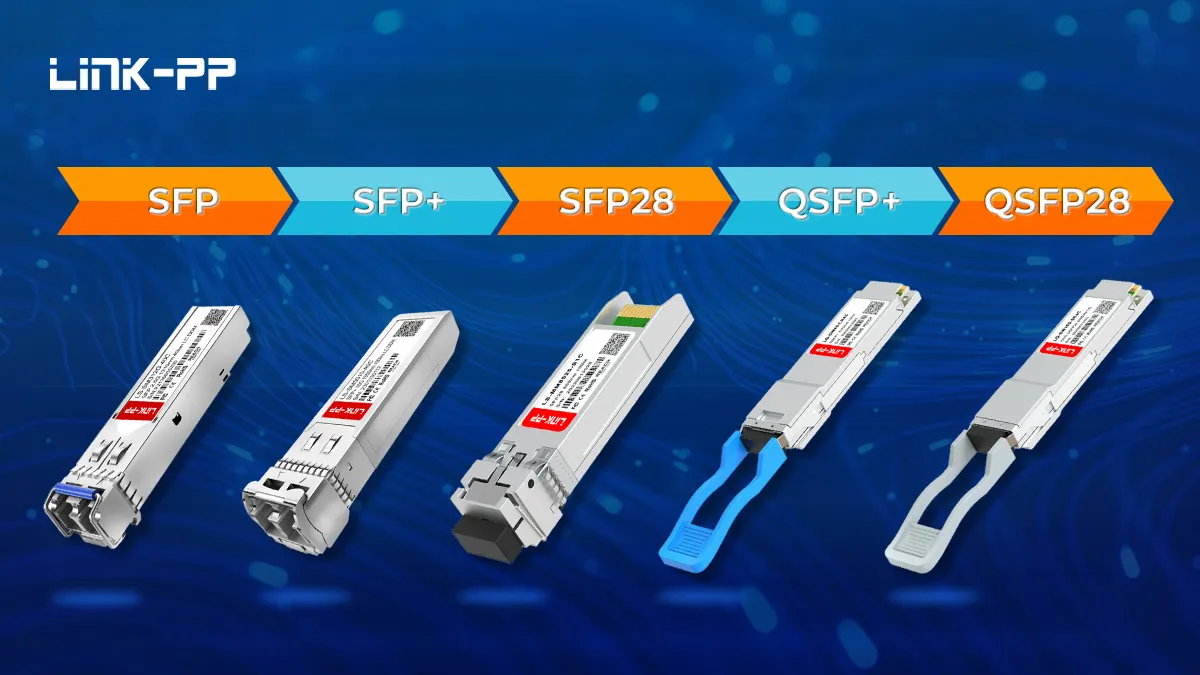
- Standard SFP: Typically supports 100 Mbps to 1.25 Gbps.
- SFP+ (SFP Plus): An enhanced version supporting speeds up to 10 Gbps.
- SFP28: Designed for 25 Gbps speeds, commonly used in high-density data centers.
2. Media and Distance Capabilities
- Multi-mode SFP (SX): Used for short-range transmission (up to 550m), typically using 850nm wavelength.
- Single-mode SFP (LX/EX/ZX): Designed for long-range connectivity (10km, 40km, or up to 120km) using 1310nm or 1550nm wavelengths.
- Copper SFP (1000Base-T): Uses RJ45 connectors and standard Cat5e/Cat6 cables for distances up to 100m.
SFP vs. SFP+ vs. QSFP: Key Differences
It is important to distinguish between these form factors to ensure hardware compatibility:
| Feature | SFP | SFP+ | QSFP+ / QSFP28 |
|---|---|---|---|
| Max Speed | 1.25 Gbps | 10 Gbps | 40 Gbps / 100 Gbps |
| Typical Use | Standard Enterprise LAN | Server Uplinks / Core Links | Data Center Aggregation |
| Size | Small | Small (Same as SFP) | Larger (Quad-channel) |
SFP Connectors: LC, SC, and RJ45
The optical connector is the physical interface where the fiber cable plugs into the module.
- LC Connector: The most common connector for SFP/SFP+ due to its small size, allowing high port density.
- SC Connector: Found in some older or specialized SFP modules, though less common today.
- RJ45: Used specifically for copper SFP modules to connect standard Ethernet patch cables.
Installation, Handling, and Maintenance Tips
To ensure long-term reliability of your SFP transceivers, follow these best practices:
- Dust Protection: Always keep dust caps on the module and fiber connectors when they are not plugged in. Even microscopic dust can block optical signals.
- Avoid Static: Use anti-static wristbands during installation to prevent ESD damage to the sensitive internal circuitry.
- Proper Insertion: Push the module into the slot until you hear a "click," indicating the latch is secure.
- Cleaning: If signal loss occurs, clean the fiber end-faces with a specialized fiber optic cleaning pen.
Frequently Asked Questions
Can I plug an SFP module into an SFP+ port?
Yes, most SFP+ ports are backward compatible and can accept standard 1G SFP modules, though they will run at the lower 1G speed.
What is BiDi SFP?
BiDi (Bidirectional) SFPs allow data transmission in both directions over a single fiber strand using two different wavelengths, effectively doubling your fiber capacity.
Does brand matter for compatibility?
While SFP is an industry standard (MSA), many manufacturers "lock" their ports to specific brands. Ensure your module is coded for compatibility with your specific switch brand (e.g., Cisco, HP, or Dell compatible).
Conclusion
SFP transceiver modules are the backbone of flexible, high-performance networks. By understanding the differences in speed, distance, and media types, you can design a scalable infrastructure that meets today's demands and adapts to tomorrow's growth. Investing in quality, compatible SFP modules ensures your network remains reliable and easy to maintain.
Tags:

-
Nav Menu
-
About LINK-PP
-
All Products
-
Applications